How to Turn Off “Flag for Review” on Instagram?
How to Turn Off “Flag for Review” on Instagram
If your new Instagram followers are not appearing immediately, or if some followers are being placed into a review section, the reason may be Instagram’s Flag for Review setting.
This feature is designed to help users review followers that Instagram may identify as suspicious, spam-like, inactive, or potentially unwanted. However, for creators, brands, influencers, and businesses, it can sometimes delay follower visibility and make follower growth look slower than expected.
In this guide, you will learn what Flag for Review on Instagram means, why it matters, and how to turn it off step by step.
What Is “Flag for Review” on Instagram?
Flag for Review is an Instagram follower setting that may hold certain new followers in a review section instead of adding them directly to your follower list.
Instagram may use this feature when it detects accounts that look like potential spam, inactive users, bot-like profiles, or accounts that may not be relevant to your profile.
This does not always mean the follower is fake. Sometimes, real users may also be flagged by mistake. That is why many users prefer to check this setting, especially when growing an Instagram account actively.
Why Should You Turn Off Flag for Review?
Turning off Flag for Review may help new followers appear more smoothly on your profile without being held for manual review.
- It may reduce delays in follower count updates.
- It can help new followers appear without manual approval.
- It may improve the flow of followers during promotions or campaigns.
- It helps avoid confusion when follower numbers do not update as expected.
- It can be useful for brands, creators, influencers, and business accounts.
How to Turn Off Flag for Review on Instagram
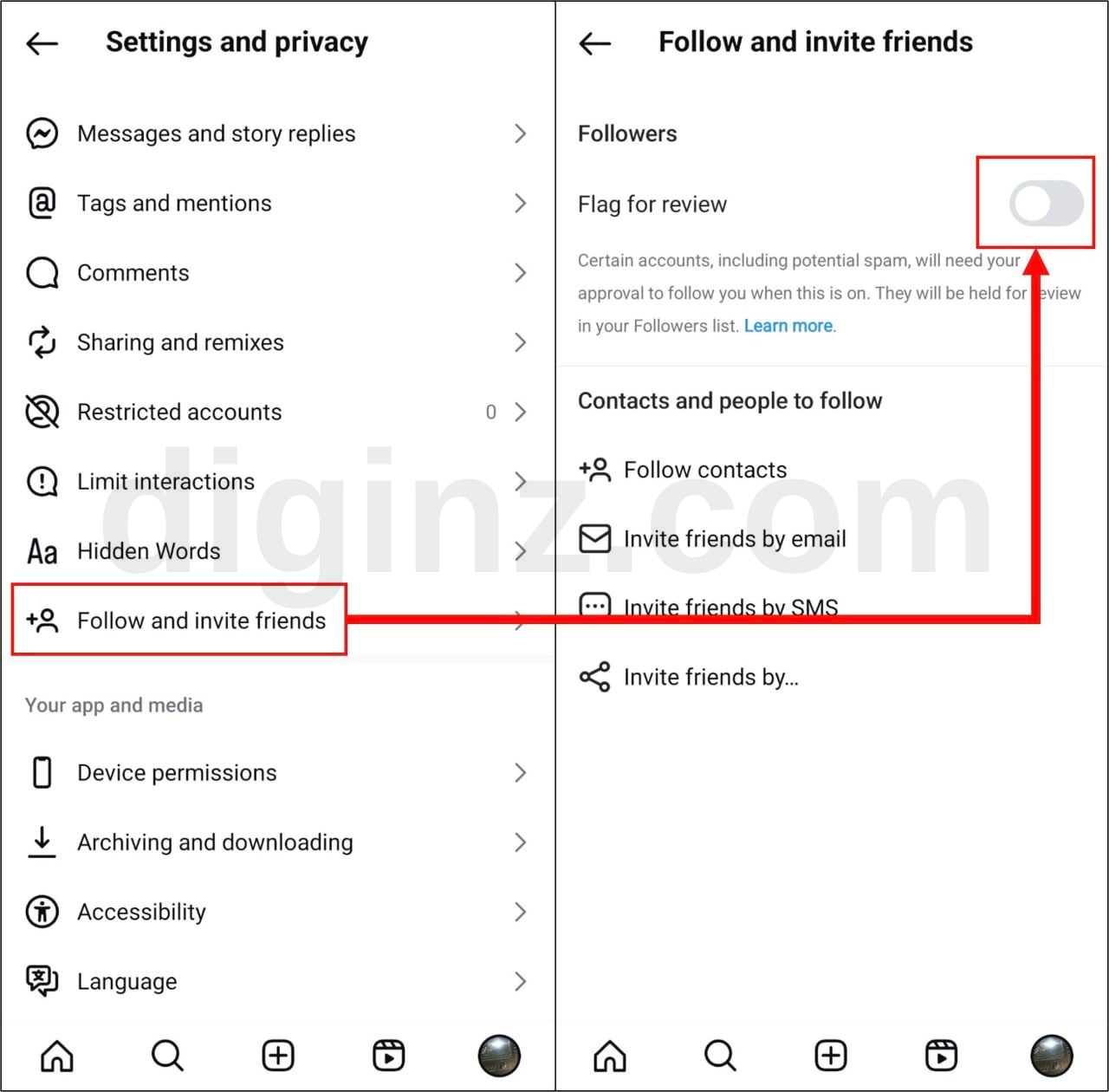
Follow the steps below to disable the Flag for Review option on Instagram:
- Open the Instagram app on your mobile device.
- Go to your profile by tapping your profile picture.
- Tap the menu icon in the top-right corner.
- Open Settings and Activity.
- Find the section related to Following and Friends, Followers, or Follow and Invite Friends.
- Look for the option called Flag for Review.
- Turn off the Flag for Review option.
After turning this option off, new followers may be added to your follower list more smoothly instead of being placed into the review section.
Alternative Method: Check Potential Spam Followers
If some followers have already been flagged, you may need to check your follower list manually.
Open your followers section and look for an area such as Potential Spam, Flagged for Review, or similar wording. From there, Instagram may allow you to review, approve, or remove those followers.
Why Are Instagram Followers Flagged for Review?
Instagram may flag followers for several reasons. These can include:
- Suspicious account activity
- Spam-like behavior
- Incomplete or inactive profiles
- Accounts with unusual following patterns
- Accounts Instagram considers potentially irrelevant or unwanted
Since Instagram uses automated systems, some real users may also be flagged. This is why turning off or reviewing this setting can be helpful for users who want smoother follower growth.
Does Turning Off Flag for Review Increase Followers?
Turning off Flag for Review does not directly increase your followers. However, it may help prevent some new followers from being held in the review section.
This means your follower count may update more smoothly, especially when your account is receiving new followers from organic growth, promotions, influencer campaigns, or social media marketing services.
Best Practices Before Growing Your Instagram Account
Before starting any Instagram growth campaign, make sure your account is properly prepared. This helps reduce delays and improves the delivery process.
- Keep your Instagram profile public.
- Make sure your profile link or post link is correct.
- Do not change your username during an active campaign.
- Do not delete, archive, or restrict the target post.
- Do not place multiple orders for the same link at the same time.
- Check your follower review settings before starting.
Common Problems and Solutions
I cannot find the Flag for Review option
Instagram may change menu names depending on your app version, account type, region, or device. If you cannot find the option, update your Instagram app and check your settings again.
My followers are still not showing
Instagram follower counts may not update instantly. Wait for some time, make sure your profile is public, and check whether any followers are waiting in the review or potential spam section.
Some followers are listed as Potential Spam
Open your follower list and check whether Instagram shows a Potential Spam or review section. You may be able to approve or remove these followers manually.
FAQ
What does Flag for Review mean on Instagram?
It means Instagram may place certain followers into a review section before adding them normally to your follower list.
Is Flag for Review bad?
Not necessarily. It can help filter unwanted followers, but it may also delay some real followers from appearing on your profile.
Should businesses turn off Flag for Review?
Many businesses, creators, and influencers prefer to turn it off when they want smoother follower growth. However, if you want stronger manual control over incoming followers, you may keep it on.
Does this setting affect Instagram likes or views?
This setting is mainly related to followers. However, keeping your profile public and correctly configured is also important for likes, views, and other engagement services.
Can I turn Flag for Review back on later?
Yes. You can return to the same Instagram settings area and enable it again whenever you want.
Final Thoughts
Instagram’s Flag for Review setting can be useful for filtering unwanted followers, but it may also delay new followers from appearing on your profile. If you want a smoother follower growth experience, turning this option off can be helpful.
Before starting any Instagram growth activity, always make sure your profile is public, your links are correct, and your account settings are properly configured.